

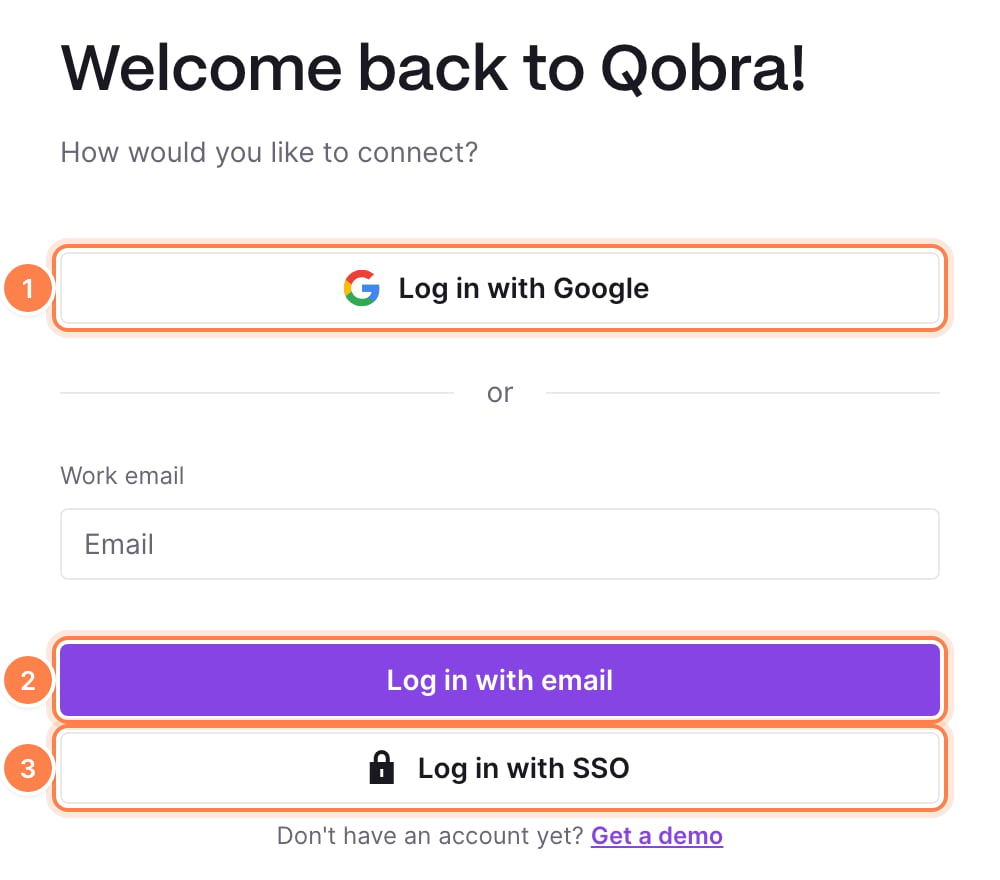
Sign-in methods
An admin turns each method on or off in Settings > Security. At least one method stays on. See Sign-in methods and sessions for each setting, and SAML single sign-on to connect Okta, Microsoft Entra ID, Keycloak or any SAML 2.0 provider.
When SAML SSO is on and the password method is off, Qobra recognizes your email domain on the login screen and redirects your users to your identity provider right after they enter their email.
Qobra has no multi-factor authentication of its own. To require it, turn off
the password method and enforce MFA in Google Workspace or in your identity
provider.
How users get access
A user signs in only once their access is active. There are three ways to give it:- Invitation (default): an admin adds the user and sends the Qobra invitation. The email offers the sign-in methods your company has on, and its link expires after 31 days. See Introduction to users.
- Invite free access: with Google or SAML SSO on, users an admin adds can sign in directly, without an invitation.
- SCIM provisioning: your identity provider creates the users assigned to Qobra and revokes their access when they leave. See SCIM provisioning.
Sessions
A session ends when the user has not used Qobra for the Session duration set in Settings > Security: 1 hour, 8 hours, 1 day, 3 days or 7 days (the default). Signing out ends it right away.Who can change these settings
These settings sit in the Company part of Settings. They require a role whose company settings permissions include:- Security: Can edit, for the sign-in methods, the SAML SSO configuration, Invite free access and the session duration;
- edit access to Integrations, for User provisioning.
Other ways to reach Qobra data
These don’t sign a person in to the app, and each has its own credentials:- the public API uses company API keys, created in Settings > API;
- the MCP server signs each user in through Qobra with OAuth, with their own permissions.
In this section
Sign-in methods and sessions
Password, Google, invite free access and session duration.
SAML single sign-on
Connect Okta, Microsoft Entra ID, Keycloak or any SAML 2.0 provider.
SCIM provisioning
Create users from your identity provider and revoke them when they leave.