Fetch users
curl --request GET \
--url https://api.qobra.co/v1/users \
--header 'X-API-Key: <api-key>'import requests
url = "https://api.qobra.co/v1/users"
headers = {"X-API-Key": "<api-key>"}
response = requests.get(url, headers=headers)
print(response.text)const options = {method: 'GET', headers: {'X-API-Key': '<api-key>'}};
fetch('https://api.qobra.co/v1/users', options)
.then(res => res.json())
.then(res => console.log(res))
.catch(err => console.error(err));<?php
$curl = curl_init();
curl_setopt_array($curl, [
CURLOPT_URL => "https://api.qobra.co/v1/users",
CURLOPT_RETURNTRANSFER => true,
CURLOPT_ENCODING => "",
CURLOPT_MAXREDIRS => 10,
CURLOPT_TIMEOUT => 30,
CURLOPT_HTTP_VERSION => CURL_HTTP_VERSION_1_1,
CURLOPT_CUSTOMREQUEST => "GET",
CURLOPT_HTTPHEADER => [
"X-API-Key: <api-key>"
],
]);
$response = curl_exec($curl);
$err = curl_error($curl);
curl_close($curl);
if ($err) {
echo "cURL Error #:" . $err;
} else {
echo $response;
}package main
import (
"fmt"
"net/http"
"io"
)
func main() {
url := "https://api.qobra.co/v1/users"
req, _ := http.NewRequest("GET", url, nil)
req.Header.Add("X-API-Key", "<api-key>")
res, _ := http.DefaultClient.Do(req)
defer res.Body.Close()
body, _ := io.ReadAll(res.Body)
fmt.Println(string(body))
}HttpResponse<String> response = Unirest.get("https://api.qobra.co/v1/users")
.header("X-API-Key", "<api-key>")
.asString();require 'uri'
require 'net/http'
url = URI("https://api.qobra.co/v1/users")
http = Net::HTTP.new(url.host, url.port)
http.use_ssl = true
request = Net::HTTP::Get.new(url)
request["X-API-Key"] = '<api-key>'
response = http.request(request)
puts response.read_body{
"count": 4570,
"data": [
{
"id": "5537a5b05d6e4824940e9e1bb9a5ebb8",
"email": "john-doe@company.com",
"name": "John Doe",
"role": "Sales Rep",
"currency": "EUR",
"calculation_currency": "USD",
"country": "France",
"code": "AO32ND56",
"...": "..."
},
"..."
],
"next": "https://api.qobra.co/v1/users?limit=2000&offset=2000"
}User management
Fetch users
Retrieves users
GET
/
v1
/
users
Fetch users
curl --request GET \
--url https://api.qobra.co/v1/users \
--header 'X-API-Key: <api-key>'import requests
url = "https://api.qobra.co/v1/users"
headers = {"X-API-Key": "<api-key>"}
response = requests.get(url, headers=headers)
print(response.text)const options = {method: 'GET', headers: {'X-API-Key': '<api-key>'}};
fetch('https://api.qobra.co/v1/users', options)
.then(res => res.json())
.then(res => console.log(res))
.catch(err => console.error(err));<?php
$curl = curl_init();
curl_setopt_array($curl, [
CURLOPT_URL => "https://api.qobra.co/v1/users",
CURLOPT_RETURNTRANSFER => true,
CURLOPT_ENCODING => "",
CURLOPT_MAXREDIRS => 10,
CURLOPT_TIMEOUT => 30,
CURLOPT_HTTP_VERSION => CURL_HTTP_VERSION_1_1,
CURLOPT_CUSTOMREQUEST => "GET",
CURLOPT_HTTPHEADER => [
"X-API-Key: <api-key>"
],
]);
$response = curl_exec($curl);
$err = curl_error($curl);
curl_close($curl);
if ($err) {
echo "cURL Error #:" . $err;
} else {
echo $response;
}package main
import (
"fmt"
"net/http"
"io"
)
func main() {
url := "https://api.qobra.co/v1/users"
req, _ := http.NewRequest("GET", url, nil)
req.Header.Add("X-API-Key", "<api-key>")
res, _ := http.DefaultClient.Do(req)
defer res.Body.Close()
body, _ := io.ReadAll(res.Body)
fmt.Println(string(body))
}HttpResponse<String> response = Unirest.get("https://api.qobra.co/v1/users")
.header("X-API-Key", "<api-key>")
.asString();require 'uri'
require 'net/http'
url = URI("https://api.qobra.co/v1/users")
http = Net::HTTP.new(url.host, url.port)
http.use_ssl = true
request = Net::HTTP::Get.new(url)
request["X-API-Key"] = '<api-key>'
response = http.request(request)
puts response.read_body{
"count": 4570,
"data": [
{
"id": "5537a5b05d6e4824940e9e1bb9a5ebb8",
"email": "john-doe@company.com",
"name": "John Doe",
"role": "Sales Rep",
"currency": "EUR",
"calculation_currency": "USD",
"country": "France",
"code": "AO32ND56",
"...": "..."
},
"..."
],
"next": "https://api.qobra.co/v1/users?limit=2000&offset=2000"
}Response fields
Each user in the response contains a fixed set of standard fields plus any custom user attributes configured for your Qobra account. Standard fields (always returned):id— user ID (ObjectId)email— user emailname— user namestatus— one ofactive,archived,inactive,pendingrole— user rolecurrency— user currency codecalculation_currency— currency used for commission calculations
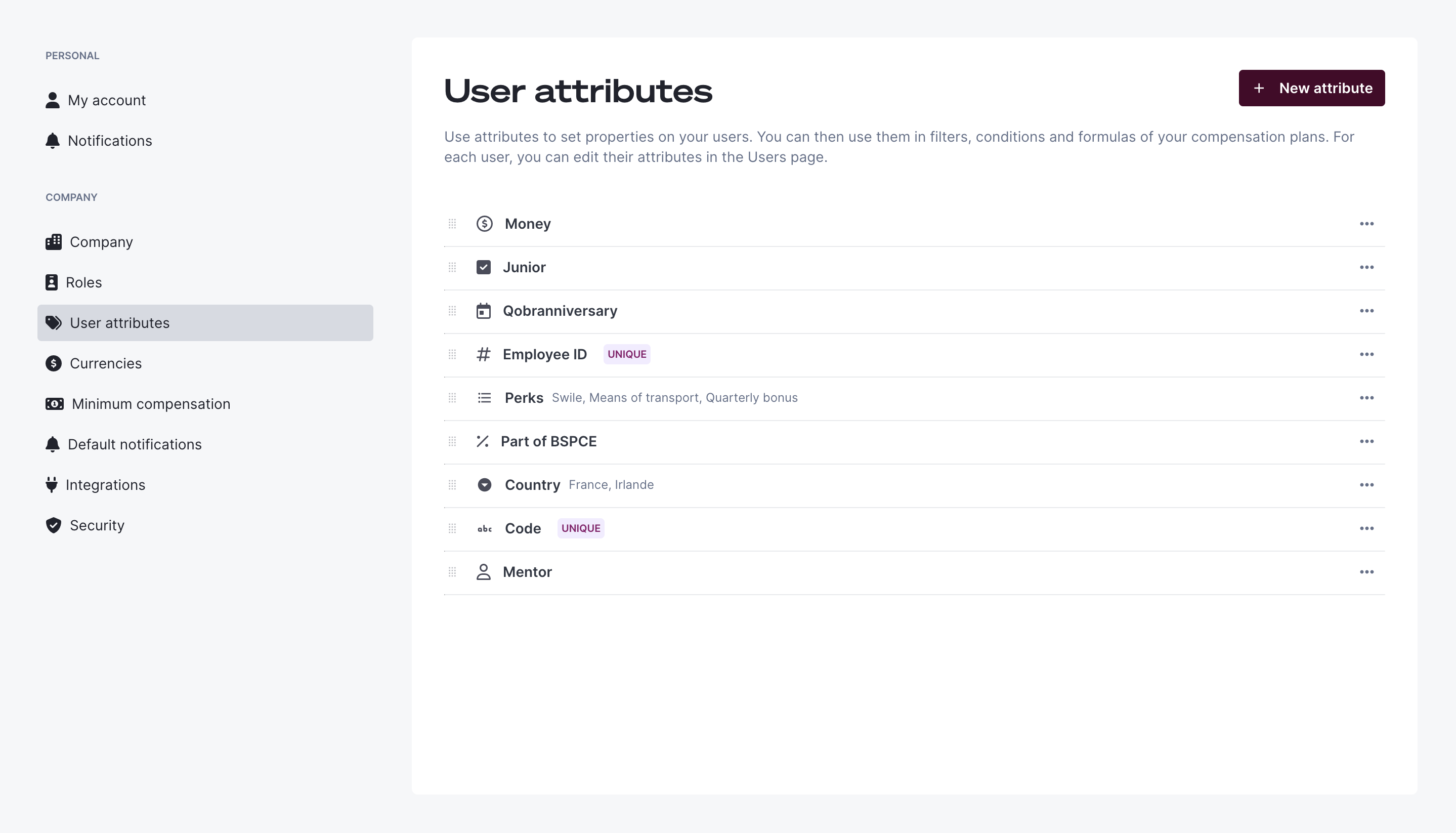
Qobra settings > User attributes appears in
each user object under its own API key. Amount-type attributes also add a
<user-attribute-api-key>_currency field alongside the value.
Fields such as
business_unit, team, region, or manager are not
standard fields on this endpoint. If they exist in your account, they are
custom user attributes and appear under the API key you assigned to them in
Qobra settings > User attributes.Discover your custom user attribute API keys
Custom user attributes are defined per Qobra account, so their API keys are specific to your organization.- Open
Qobra settings > User attributesin the Qobra app. - Locate the attribute you want (for example, a business unit attribute).
- Copy its API key. This is the exact key that appears in the
GET /v1/usersresponse for every user that has a value for that attribute.

Pagination
This endpoint is paginated using parameters offset and limit The “next” key in the response allow you to easily follow pagination to get the next batch of recordsVariable api keys
This endpoint is based on dynamic fields. This mean that all annotations that look like<variable-key>, will have to or will be replaced by their
actual API keys.Authorizations
Query Parameters
Optional (minimum:0 - maximum:9223372036854775807)
Required range:
0 <= x <= 9223372036854776000Optional (minimum:0 - maximum:2000): if set to 0 return total count only
Required range:
0 <= x <= 2000Was this page helpful?