> ## Documentation Index
> Fetch the complete documentation index at: https://docs.qobra.co/llms.txt
> Use this file to discover all available pages before exploring further.
# Introduction
Qobra works by processing data, which we divide into two types:
* **User data**, meaning data about your employees, the management structure of your organisation, groups of employees …
* **Data tables** that are necessary to calculate compensations (for instance sales opportunities, quota and objectives, invoicing data, …). Those data tables represent any data that needs to be crunched to get your compensation amounts right.
## Synchronize user data
User data can be synchronized several ways:
* with [your HRIS](/integration_documentation/hris/hris_connector) (Workday, ADP, Lucca, Factorial, Sage ...)
* via Qobra’s APIs
 ### API endpoints
To synchronize data in Qobra, you’ll need:
* the [Upsert users bulk](/api_reference/v1/endpoints/users/upsert_bulk_user) route, to upsert users in bulk
* the [Upsert group attributions bulk](/api_reference/v1/endpoints/users/upsert_bulk_user_group) route, to assign each user a group
* the [Upsert manager attributions bulk](/api_reference/v1/endpoints/users/upsert_bulk_user_manager) route, to assign each user a manager
* the [Archive users bulk](/api_reference/v1/endpoints/users/archive_users) route, to archive users
## Synchronize data tables
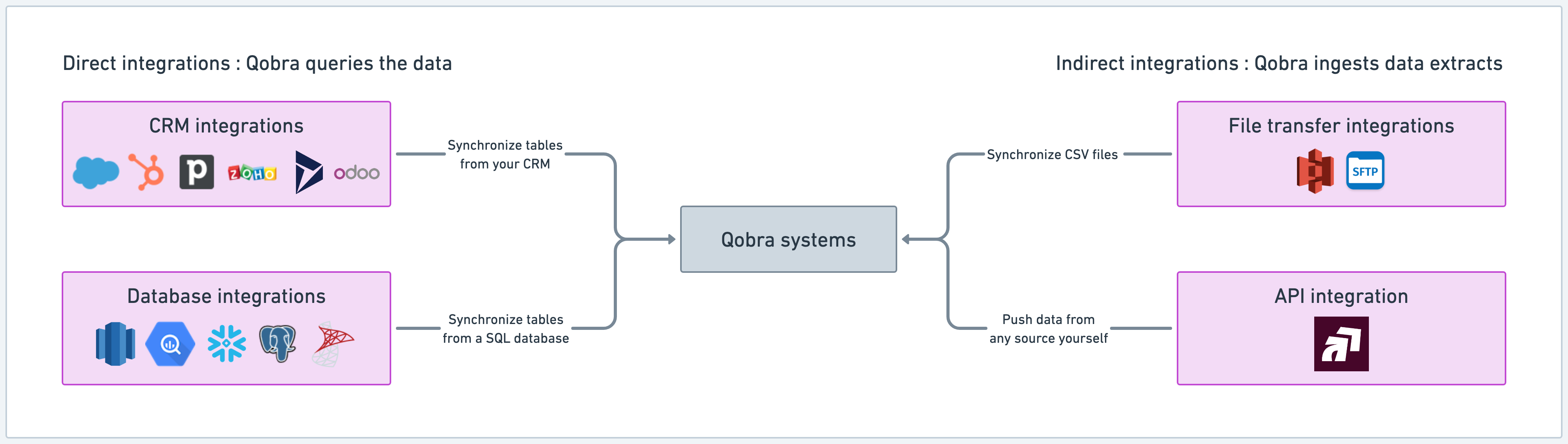
Data tables can be synchronized several ways:
* with CRM integrations ([Salesforce](/integration_documentation/crms/salesforce),
[Hubspot](/integration_documentation/crms/hubspot),
[Pipedrive](/integration_documentation/crms/pipedrive),
[Microsoft Dynamics](/integration_documentation/crms/microsoft_dynamics),
[Zoho CRM](/integration_documentation/crms/zoho),
[Odoo](/integration_documentation/crms/odoo))
* with Database & datalake integrations (
[Snowflake](/integration_documentation/databases/snowflake),
[Bigquery](/integration_documentation/databases/bigquery),
[PostgreSQL](/integration_documentation/databases/postgresql))
* with File transfer integrations ([S3](/integration_documentation/files/s3), [SFTP](/integration_documentation/files/sftp))
* via Qobra’s APIs
### API endpoints
To synchronize data in Qobra, you’ll need:
* the [Upsert users bulk](/api_reference/v1/endpoints/users/upsert_bulk_user) route, to upsert users in bulk
* the [Upsert group attributions bulk](/api_reference/v1/endpoints/users/upsert_bulk_user_group) route, to assign each user a group
* the [Upsert manager attributions bulk](/api_reference/v1/endpoints/users/upsert_bulk_user_manager) route, to assign each user a manager
* the [Archive users bulk](/api_reference/v1/endpoints/users/archive_users) route, to archive users
## Synchronize data tables
Data tables can be synchronized several ways:
* with CRM integrations ([Salesforce](/integration_documentation/crms/salesforce),
[Hubspot](/integration_documentation/crms/hubspot),
[Pipedrive](/integration_documentation/crms/pipedrive),
[Microsoft Dynamics](/integration_documentation/crms/microsoft_dynamics),
[Zoho CRM](/integration_documentation/crms/zoho),
[Odoo](/integration_documentation/crms/odoo))
* with Database & datalake integrations (
[Snowflake](/integration_documentation/databases/snowflake),
[Bigquery](/integration_documentation/databases/bigquery),
[PostgreSQL](/integration_documentation/databases/postgresql))
* with File transfer integrations ([S3](/integration_documentation/files/s3), [SFTP](/integration_documentation/files/sftp))
* via Qobra’s APIs
 ### API endpoints
To synchronize data tables in Qobra, you’ll need:
* the [Upsert records bulk](/api_reference/v1/endpoints/data_tables/ingest_records) route, to upsert records in bulk in a data table
* the [Fetch import](/api_reference/v1/endpoints/imports/fetch_import) route, to check your import's status
### Refresh Frequency
Qobra uses two types of data synchronization methods to keep your data up to date:
1. **Full Refresh**: A complete scan of all your data within the configured perimeter
2. **Differential Refresh**: A scan that only looks for changes since the last synchronization
The refresh frequency varies by integration type:
#### CRM Integrations
* **Salesforce, Hubspot, PipeDrive, Microsoft Dynamics, Zoho**
* Daily Full Refresh (during night hours)
* Bi-hourly Updates
* On-Demand Updates
* **Odoo**
* Bi-hourly Full Refresh
* On-Demand Updates
#### Database, Datalake, and File Transfer Integrations
* **Snowflake, BigQuery, PostgreSQL, S3, SFTP**
* Default: Four Full Refreshes per day
* Customizable frequency and timing through the integration settings
### API endpoints
To synchronize data tables in Qobra, you’ll need:
* the [Upsert records bulk](/api_reference/v1/endpoints/data_tables/ingest_records) route, to upsert records in bulk in a data table
* the [Fetch import](/api_reference/v1/endpoints/imports/fetch_import) route, to check your import's status
### Refresh Frequency
Qobra uses two types of data synchronization methods to keep your data up to date:
1. **Full Refresh**: A complete scan of all your data within the configured perimeter
2. **Differential Refresh**: A scan that only looks for changes since the last synchronization
The refresh frequency varies by integration type:
#### CRM Integrations
* **Salesforce, Hubspot, PipeDrive, Microsoft Dynamics, Zoho**
* Daily Full Refresh (during night hours)
* Bi-hourly Updates
* On-Demand Updates
* **Odoo**
* Bi-hourly Full Refresh
* On-Demand Updates
#### Database, Datalake, and File Transfer Integrations
* **Snowflake, BigQuery, PostgreSQL, S3, SFTP**
* Default: Four Full Refreshes per day
* Customizable frequency and timing through the integration settings