> ## Documentation Index
> Fetch the complete documentation index at: https://docs.qobra.co/llms.txt
> Use this file to discover all available pages before exploring further.
# Introduction
> Discover Qobra's new Public API V2 for flexible and performant data extraction
## Welcome to Qobra Public API V2
The V2 of Qobra's Public API provides a modern, flexible, and performant way to extract your commission data. Built with large-scale data extraction in mind, it's designed to work seamlessly with BI tools, ETL pipelines, and custom integrations.
## What's New in V2?
V2 introduces a fundamentally different approach to data access, making it easier to discover what data is available and extract it efficiently.
### Key Improvements
Dynamically discover available data structures and their fields — no more
guessing what's available
Efficient pagination for large datasets (200K+ records) with consistent
performance
Filter data by last modified date for efficient incremental syncs
Rich field metadata including types, formats, currencies, and enum values
## Base URL
```
https://api.qobra.co/v2/
```
## Authentication
Authentication works the same as V1. Include your API key in the request header:
```json theme={null}
{
"X-API-Key": ""
}
```
### Generate Your API Key
API keys are managed in Qobra's global settings, in the **API** section.
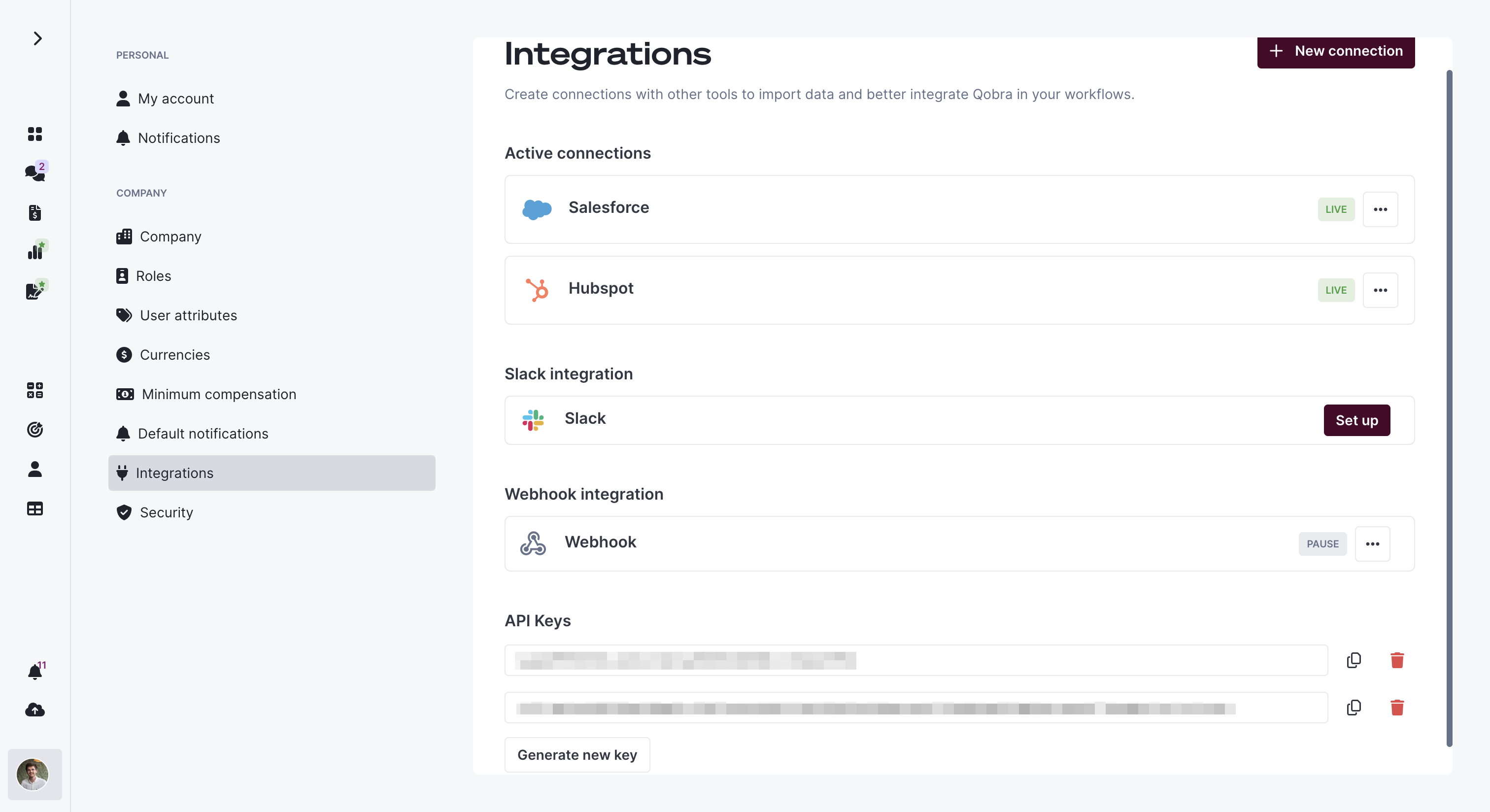 API keys are strictly personal and tied to the user account that generated
them. Treat them as sensitive credentials.
## Core Concepts
V2 introduces key concepts that power the API:
* **Data Structures**: Tables containing your commission data (statements reporting and records reporting)
* **Schema Discovery**: Dynamically inspect available fields and their types
* **ID-Based Pagination**: Efficient navigation through large datasets using record IDs
## Migrating from V1 to V2
**V1 Reporting endpoints are deprecated** and will be removed at the end of
2026\. If you're currently using V1 reporting endpoints
(`/v1/reporting/statements` or `/v1/reporting/records`), you must migrate to
V2 before this date to avoid service disruption.
### Why Migrate?
V2 delivers significant improvements for **all users**, regardless of dataset size:
Schema discovery eliminates breaking changes when fields evolve
15-35% performance improvement across all dataset sizes
Temporal filters reduce API load and sync times
Rich metadata ensures type-safe integrations
**Migration is straightforward** — most teams complete it in 1-3 hours. V1 and
V2 can coexist during your transition, allowing you to test without disrupting
production.
## Quick Links
Extract your first dataset in 5 minutes
Complete API endpoint documentation
## Support
Need help?
* 📧 Email: [support@qobra.co](mailto:support@qobra.co)
* 📚 Help Center: [help.qobra.co](https://help.qobra.co/en/)
* 💬 In-app chat support
## Next Steps
Follow our step-by-step guide to make your first API calls in 5 minutes
API keys are strictly personal and tied to the user account that generated
them. Treat them as sensitive credentials.
## Core Concepts
V2 introduces key concepts that power the API:
* **Data Structures**: Tables containing your commission data (statements reporting and records reporting)
* **Schema Discovery**: Dynamically inspect available fields and their types
* **ID-Based Pagination**: Efficient navigation through large datasets using record IDs
## Migrating from V1 to V2
**V1 Reporting endpoints are deprecated** and will be removed at the end of
2026\. If you're currently using V1 reporting endpoints
(`/v1/reporting/statements` or `/v1/reporting/records`), you must migrate to
V2 before this date to avoid service disruption.
### Why Migrate?
V2 delivers significant improvements for **all users**, regardless of dataset size:
Schema discovery eliminates breaking changes when fields evolve
15-35% performance improvement across all dataset sizes
Temporal filters reduce API load and sync times
Rich metadata ensures type-safe integrations
**Migration is straightforward** — most teams complete it in 1-3 hours. V1 and
V2 can coexist during your transition, allowing you to test without disrupting
production.
## Quick Links
Extract your first dataset in 5 minutes
Complete API endpoint documentation
## Support
Need help?
* 📧 Email: [support@qobra.co](mailto:support@qobra.co)
* 📚 Help Center: [help.qobra.co](https://help.qobra.co/en/)
* 💬 In-app chat support
## Next Steps
Follow our step-by-step guide to make your first API calls in 5 minutes